
Restore · Scanned photos
Enhance your scanned photos
You did the responsible thing: scanned the family archive. And the scans look... grey. Flat, soft, dust-speckled — worse, somehow, than the prints. The scan preserved the photo; enhancement, free, makes it worth looking at.

This page is for people who already have the digital files — from a scanner, a scanning service, or years of accumulated family emails — and want them to actually look good. That step is free.
Why scans disappoint
A scanner’s job is fidelity, not flattery — it records the print exactly, including everything wrong with it, then adds its own layer: a contrast-flattening exposure curve, every dust mote on the glass, a whisper of optical softness, sometimes a lamp-driven color cast. The result is technically faithful and visually inert. Your memory of the print was made in warm room light by an interested human; the scan was made by a cold bar of LEDs in a hurry.
Enhancement closes that gap. It restores the tonal depth the scanner compressed, removes the dust it faithfully recorded, and sharpens the softness it introduced — free — so the file finally matches the photo you remember holding.
The bridge step
Enhanced scans are the hinge of the whole FotoRipple journey: the scanning guides get the archive digitized, this free step makes it beautiful, and from there the best images flow onward — colorized, animated, or assembled into the family memory video the scanning project was secretly always for.
How it works
- 1Upload the scan as-is. Flatbed output, scanning-service files, or old JPEGs from relatives — all fine.
- 2Free enhancement. Contrast opens up, dust and scanner artifacts lift, softness sharpens naturally.
- 3Stack with restoration. If the underlying print was faded or damaged, that repairs in the same free pass.
- 4Then go further if you like. Colorize free, or animate the best.
Fixes the scanner's sins
Flat contrast, dust shadows, slight blur, color casts from the scanner lamp — the digitization layer of damage, removed.
And the print's sins beneath
Most scans are of imperfect prints. Enhancement and restoration run together, free, on the same upload.
Rescues old digitization projects
That 2009 scanning marathon at 300dpi? Those files improve dramatically — no rescanning required.
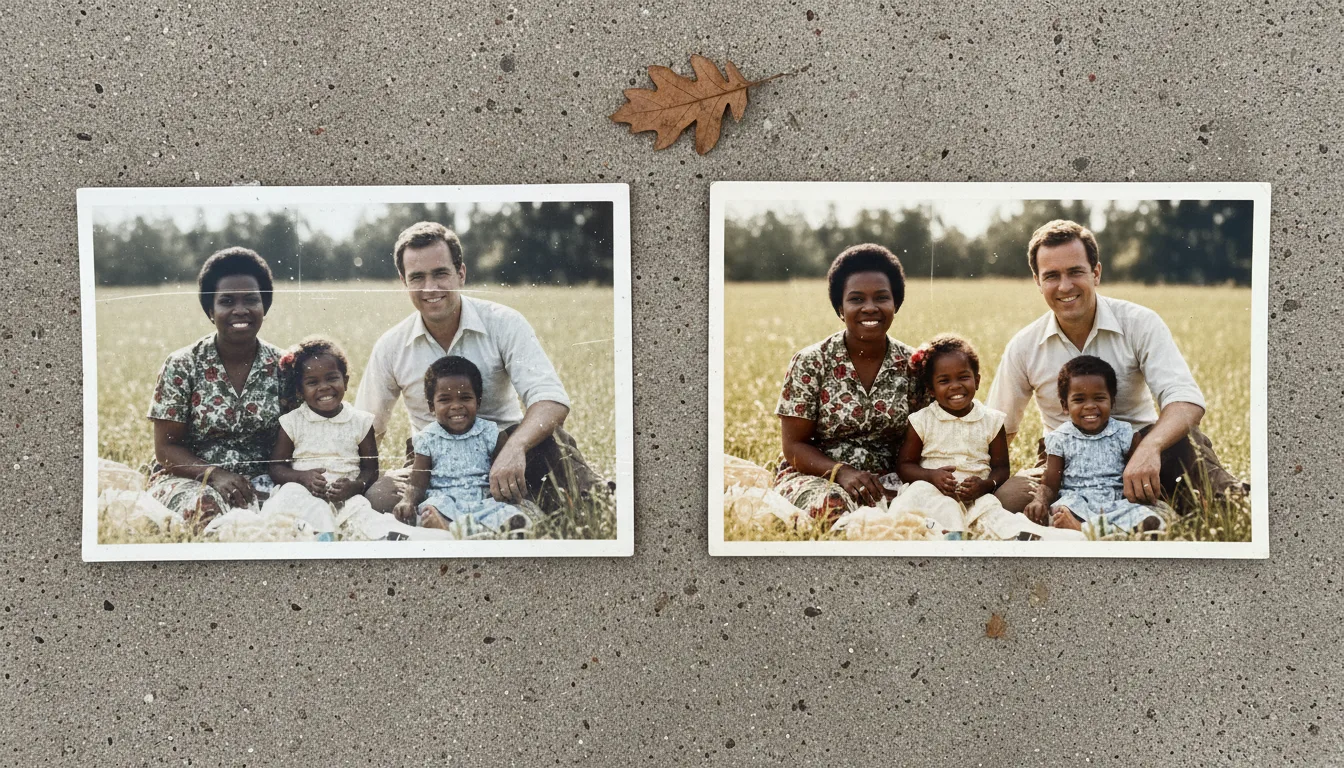
Example: the scanning service's homework
Imagine paying a service to scan 400 family prints, and receiving a drive of technically accurate, emotionally dead files — every photo greyer and softer than you remember the prints being. Run through free enhancement, the same files wake up: blacks are black again, faces sharpen, the dust the service scanned along with the photos disappears. The archive you paid for becomes the archive you wanted.
Hypothetical but common — bulk scanning optimizes for throughput, not beauty.
Tips for the best result
- Enhance before sharing scans with family — first impressions decide whether relatives engage with the archive.
- Don't rescan yet: enhancement often recovers what you assumed was a bad scan.
- For future scans, capture flat and evenly lit — the guide — and let enhancement handle the rest.
- Old low-resolution scans benefit from upscaling after enhancement if you want prints.
- Keep original scan files alongside enhanced versions — archival habit, zero cost.